Wednesday, March 9, 2011

How To Enable or Disable Simple File Sharing in Windows XP

Here's How:

1. Open My Computer from the Start Menu or Windows XP Desktop. A new My Computer window will appear.
2. Open the Tools menu and choose the "Folder Options..." option from this menu. A new Folder Options window will appear.
3. Click on the View tab and locate the "Use Simple File Sharing (Recommended)" checkbox in the list of Advanced Settings.
4. To enable Simple File Sharing, ensure this checkbox is checked. To disable Simple File Sharing, ensure this checkbox is not checked. Click inside the checkbox to alternately enable and disable the option.
5. Click OK to close the Folder Options window. The settings for Simple File Sharing are now updated; no computer reboot is required.

Tips:

1. The Simple File Sharing checkbox should be at or near the bottom of the Advanced Settings list in the My Computer Folder Options.
2. Enabling Simple File Sharing prevents the ability to assign user-level passwords to shares. When Simple File Sharing is enabled on a computer, remote users will not be prompted for a password when accessing that computer's shares.
3. If the Windows XP Professional computer is part of a Windows domain rather than a Windows workgroup, this process for enabling or disabling Simple File Sharing has no effect. Simple File Sharing always remains disabled for computers joined to domains.
How to Change the Startup Programs in Windows 7

Here is the steps through Program Files:-

1. Open the program's settings menu.


2. To Add the Program to Startup


* Select the program's Run at startup type option.


3. To Remove the Program from Startup


* Unselect the program's Run at startup type option.

Another method through System Configuration:-


Note: For getting into msconfig you need to login as an Administrator Account or need Administrator Password.

1. Open the Start Menu.

* In the search line, type msconfig and press Enter.
* Go to step 3.


2. Open the Control Panel (All items view) and click on the Administrative Tools icon, then click on System Configuration. Close the Control Panel and Administrative Tools windows.


3. If prompted, click on Continue for the UAC prompt, or type in the administrator's password.

4. Click on the Startup tab.


5. To Disable a Startup Program.

* Select a listed startup program and uncheck it.
* Repeat to disable anymore listed startup programs.

6. To Enable a Startup Program

* Select a listed startup program and check it.
* Repeat to enable anymore listed startup programs.

7. To Disable All Listed Startup Programs

* Click on the Disable all button. (See screenshot below step 4)
* Go to step 8.


8. To Enable All Listed Startup Programs


* Click on the Enable all button.


9. Click on Apply and OK.


10. Click on the Restart button to apply.

Tuesday, March 8, 2011

How To Replace A Car Battery

We all dread this day - when all the jump-starting and coddling in the world isn't going to bring our car battery back to life. But with the Expert's helpful instructions on how to change your car's battery, you'll be moving again in no time. Before even beginning these simple steps, heed the Expert's safety advice: THE CAR MUST BE OFF! To be sure, take your keys out of the ignition. Your battery can generate a highly flammable vapor so you should work in a well-ventilated area. In addition, the battery fluid is acid and HIGHLY corrosive to skin, eyes and metal. You need to be very careful when handling it. It is a good idea to wear gloves, and safety glasses are a must!


Step 1 - Make Sure the Battery Needs a Change

You don't want to jump the gun on pronouncing your old battery a goner without doing some checking first. If your battery has cracks in it, you need look no further. Order up a new battery. If not, take a look in the battery terminals before making a decision. The battery terminals are the positive and negative knobs that attach wires to the alternator. Sometimes, sulfate buildup, which corrodes the terminals, is the problem. Tap the terminals gently with a hammer to see if you can break away the corrosion. If this doesn't work, try putting a mix of baking soda and water on a brush and wiping the corrosion away. You may also need to remove the terminals and clean the contact area with the battery post. Your battery may be fine after that!

Step 2 - Remove the Old Battery

Once you've determined that you do indeed need a new battery, get ready to remove that old one. With the car off, scrub the top of the old battery with the mixture of baking soda/water that we discussed before. With your wrench, carefully unfasten the battery bolt that holds the negative clamp, sliding the cable clamp off the terminal. Then do the same thing for the positive cable clamp. Be careful not to touch the wrench to your car or any other metal surfaces to prevent causing a short circuit and sparking.

At this point, get a firm grasp on the battery and remove it from your car. After the battery is out, spend a little time cleaning out the terminal clamps and battery tray with the Expert's baking soda/water solution. If the tray and clamps aren't getting clean, you may want to have them replaced.

Step 3 - Put In the New Battery

Carefully position your new battery in the battery tray. Make sure that the positive and negative terminals are on the proper sides, then screw on the bracket so that the battery is held in place. Put the positive cable clamp over the positive terminal and connect the negative cable in the same way. Again, be careful not to touch your wrench to the car or any other metal surfaces. Then close the hood and start your car! Note: after replacing the battery, you may find that you need to adjust the clock, radio stations, etc.

Step 4 - Recycle Your Old Battery

The importance of this step can't be emphasized enough! Your dead battery is highly toxic and must be disposed of properly. You can take it to a service garage or an auto supply store, but the Expert recommends taking it to a recycling center where they will make certain that the material can be used again.

How to Get A Car Loan With Bad Credit

here are a few things, we at deal4loans think might help you in choosing the right car-financing option:

The first thing you need to know, before availing for car loan, is the type of car you want and see if it suits your estimated budget. Narrow your choice of cars, to two or three. Compare rates of all banks and get their best rates. Also ask for recommended dealers for the car(s) of your choice to see which dealer is giving you the best deal.

You apply for a loan and you buy a car. You go to a bank and fill out some forms and they disburse your check. Sounds simple enough, doesn't it?

However, your application could be denied or cancelled, or you may get an offer at a high interest rate if you have bad-credit history. All banks go through your financial history when you apply for a loan. Different banks have different standards of judging a credit history. So it is wise to clear up all old debts, if you have any, before you Apply for Car Loan. This will help you get your loan approved at lower interest rates.

You repay the loan in equated monthly installments (EMIs), comprising of principal amount and the Interest Rate. The EMI depends upon the loan amount, the interest rate and the tenure of the loan.

Also don't just evaluate the deal based on monthly EMIs. Calculate how much you will be paying over the tenure of the loan at EMI Calculator. This in turn is a function of Interest rates.

The interest rate depends on the Flat Rate and Reducing Balance method. In the Flat Rate of interest, the principal amount (on which interest calculations are made) remains same for the entire tenure of the loan. The total interest is divided over the number of installments to derive the EMI.

Reducing Balance, means reducing the paid-up principal amount (on which interest calculations are made) from the outstanding loan amount. The interest you pay is calculated on outstanding principal balance.

Car loans typically don't require a guarantor but if your income does not meet the credit criteria, then you will be required to have a guarantor for your loan. Guarantor can be your spouse, if employed, or a third party guarantee will do.

Processing fees is a one-time charge taken for processing and legal paperwork. At the beginning of the period, the bank requires you to pay 2-4 percent of the loan amount as processing fees. For example, if you take Rs.5 lac at 15% for 5 years (60 EMIS) and charges you 2 percent as processing fees, you are in effect paying an amount of Rs.10,000.

If you chose to pay up your entire money before the tenure, a Pre-payment penalty is charged. So know about such penalties before-hand to avoid future misunderstanding between you and the bank.

Also keep in mind that most banks offer you the option of pre-payment, but they do not give the flexibility of part-payment.

You "have-to" insure your car. It is against the law to drive an uninsured car. You must get an insurance policy for a year's duration, after which you have to renew it. The amount of insurance is equal to the market value of the vehicle and not the book value of the vehicle.

The premium is added to the EMI paid for the loan tenure and you are insured for the amount you have taken, incase something unexpected happens Assured amount will be given to the bank without burdening the members of the family.

So keep these few things in mind while financing your next car !You have reached the best spot to get the best loan, for your car, from the best banks. Go, fill the application form now!

How to Select a GPS Car Navigation System

accept you anytime acclimatized abaft the caster of your car apprehensive whether you absolutely apperceive how to get to your destination? abhorrence no added. GPS (all-around accession arrangement) car aeronautics systems can appearance and even acquaint you how to get to any destination. These articles use the GPS, which relies on a host of saacquaintites to actuate area you are.
  1. adjudge how generally you intend to use the arrangement. bargain arrangements artlessly bung in to your car's cigarette lighter and are baby abundant to abundance in your cuff alcove, but they're not as convenient.
  2. accede the blueprint of your car. Some arrangements appear with a adviser that affectations a map. The adviser is frequently installed on the dashboard or on a basement extending from the dashboard. In some cars, such an accession may block air vents or accomplish it somewhat afflictive for a commuter to access or avenue the car or sit in the commuter bench.
  3. baddest a arrangement that appearance assorted means of accepting to your destination. This can cover by abode, by circle, by a claimed abode book or via a area called anon from the map.
  4. attending for a arrangement that accords you articulate as able-bodied as graphical admonition. The arrangements that use a map and adviser cover arrows that appearance you the administration of a about-face and aswell announce area your car is on the map in affiliation to the destination. added arrangements use the arch assemblage or radio to affectation the name of the artery on which you are to accomplish a about-face or on which you are traveling. Both of these arrangements aswell accord you exact admonition as you access a about-face.
  5. baddest a arrangement that covers point of absorption abstracts. a lot of GPS arrangements cover areas of airports and added busline casework, ATMs and banks, restaurants, hotels and a host of added sites.
  6. accept a arrangement that offers updates of the point-of-absorption abstracts.
  7. accede accession time if you are alive on a bound account. Systems that await on maps affectationed on advisers are added complicated and yield best to install than added types of arrangements.
  8. already all blueprint accept been articular for your GPS arrangement, amount altered assemblages out. a lot of retailers will accept audience assemblages in-abundance that you can see, blow, and acquaintance. You can almeans analysis online retailers for a bigger amount. Don't overlook about eBay.

How to Install a Car Audio System

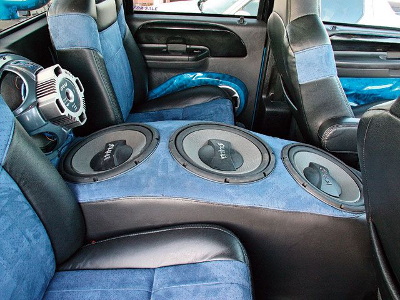
Reasons to install your own car audio system is one, if you are on a tight budget and would like to save possibly hundreds of dollars on installation costs and two, if you would like to customize your car audio system installation. Either way, it is easier than ever to install a car audio system and here are some tips.

What is a Car Audio System?

Before you install your car audio system, it is best to define what a car audio system is. Usually a car audio system includes a car stereo, sometimes referred to as a receiver or head unit. Some people define it as not only the car's stereo receiver but also 2 or more speakers and components that sometimes include an amp and sub woofer. However, for most people installing a car audio system, usually just includes the car stereo receiver.

Choose Car Audio System Components that are Compatible with Your Car

Make sure when you shop for a car stereo receiver and speakers for your car that they are compatible with your car and can fit comfortably in the spaces allocated for your car audio system. For instance, many cars have small car stereo openings, others have larger sized opening, sometimes referred to as Double DIN.
When purchasing your car audio system, make sure all components will fit in your car and that you have purchased any special adapters (called wiring harness) and brackets to fit your specific car's make and model.

Remove the Old Receiver

Before you can remove your old audio system, you will need a few specific tools. They include a few types of screwdrivers, and depending on the installation a wire stripper, a wire cutter and electrical tape.
  1. Once you have all your tools, you can disconnect the negative cable from your car battery.
  2. Remove the dash board cover, usually with a screwdriver. Once the dashboard cover is removed, you will be able to gain access to the receiver; do not pull out the receiver completely and look to see which wires are connected to it. Usually there will be three sets of wires, a power cord that goes directly to the car's battery, an antenna cord that plugs into the back of your receiver and goes to your car's antenna and the main receivers wiring harness which connects to the many speakers in your car. (The wiring harness usually is in two parts, one part connects from your receiver, the other part is connected the car's speakers, both of these harnesses plug into together. When disconnecting the wiring harness in the next step, remove the wiring harness that connects with the receiver)
  3. Now that you know which wires are which, you can disconnect all three sets of wires. Usually, you can now pull out the receiver completely and remove it.

Install the New Car Audio System

First Install the Car Audio System's Wire Harness

Most Audio receivers can be purchased with a wiring harness that can fit most vehicles. A wiring harness makes it extremely easy to install your Audio Receiver. The wiring harness makes the connection from your audio receiver to your car's speakers. You can connect all your speakers with literally one snap. The wiring harness connects to the car's wiring harness with a snap, now you are ready for the receiver's installation.

Install the New Car Audio Receiver

Now that the car's wiring harness is connected to the new car audio receiver harness, you can easily install the other receiver. First slide the mounting bracket that came with your new receiver. In some cases you can use the same bracket that your old stereo came with.
  1. Now bring your receiver as close as possible to the receiver opening in the dash and plug in the receivers wiring harness into the back of the receiver, remember the other half is already connected to the cars wires. (Important Note: most car's wiring harness includes the power cable, if not it will be a separate cable usually red and black together that needs to be manually connected from the car to th receiver)
  2. The remaining cable should be the antenna cable; you can easily plug this cable into the back of the receiver.
  3. Once all wires are hooked up to the car, slide in your receiver, but do not fasten any bolts or put the dash board cover on yet. First reconnect the negative cable to your car's battery. Your car should start. Once the car has started, turn on your radio and see if everything works properly.
If everything is working properly, you can now screw in the bolts and replace your dash board cover; your audio receiver installation is complete.

Notes

All installations are different, so make sure you read the instructions of both your new receiver and car manual to make sure you install everything correctly.
Always disconnect the battery when working with car electronics or installing a stereo or any other components.

Monday, March 7, 2011

How to Take a Mental Health Day

The official World Mental Health Day is celebrated every 10th of October, with the goal of advocating mental health education and awareness. However, there’s another way you could celebrate Mental Health Day.
  • Know what a Mental Health Day is. To take a mental health day means to take an unscheduled day off from work or school, in order to sort out your psychological or emotional problems. You could take a mental health day if you’re feeling too stressed or frustrated at work, if you’re in the midst of a high-pressure project and you just want to take a break from it, or if you’re suffering from anxiety at the very thought of going to the office.
  • Avoid the guilt. A mental health day may not be the typical reason for having the day off. But think of it this way: How will you be able to work effectively if you’re just not in good condition mentally or emotionally? As you will need to rest your body in case you have a physical ailment, so should you rest your mind so you could achieve healthful mental stability. Plus, you’ve got the experts backing you up: according to the World Health Organization, health is “not only the absence of infirmity and disease but also a state of physical, mental and social well-being.”
  • Take the whole day to relax. Having a mental health day means you should really rest and relax your body and mind. It is not a day for you to do your chores or to run errands. Treat this day as a day for you to recuperate from the stressors at work. Stay in bed, listen to restful music, take some warm chicken soup, and catch up with your reading.
  • Be strategic. Though it could be very tempting to take a mental health day on Mondays, avoid doing this. That’s because you would be most likely accused of malingering if you’re not in the office on a dreaded Monday. It’s best that you take your day off in the middle of the week; another bonus to this is that midweek is the best time for you to recharge after the pressures of Monday and Tuesday.
    In addition, take your mental health day during the day when you don’t have any deadlines due or office meetings scheduled. The stress of thinking about that unfulfilled obligation will just render your off futile! 


    • Call up your office. Inform your supervisor that you’re not feeling well that day and you need to take the day off. Don’t feel like you need to explain yourself too much. The key here is not to do this too often, or else your bosses will have a harder time accepting your absence.
    • Have a coworker ready to take over. You should have a “partner” at work that can readily take over your general responsibilities while you’re away. You could return the favor for him whenever he needs to take a mental health day himself. Also, you should make it a point to organize and label your files well so the others at work can easily access them when necessary.
    • Turn off your cell phone. It won’t do you any good to take a mental health day if the stresses from the office can follow you to your home! Once you’ve given your instructions, leave it at that and sign off.

    Learn to value your mental health, and give your mind the opportunity to rest and relax now and then. Good luck!